


Powerful NDI-based Scalable Multi-Camera Control solution for Any Production Environment
Seamless Multi-Operator Workflow for Demanding Productions
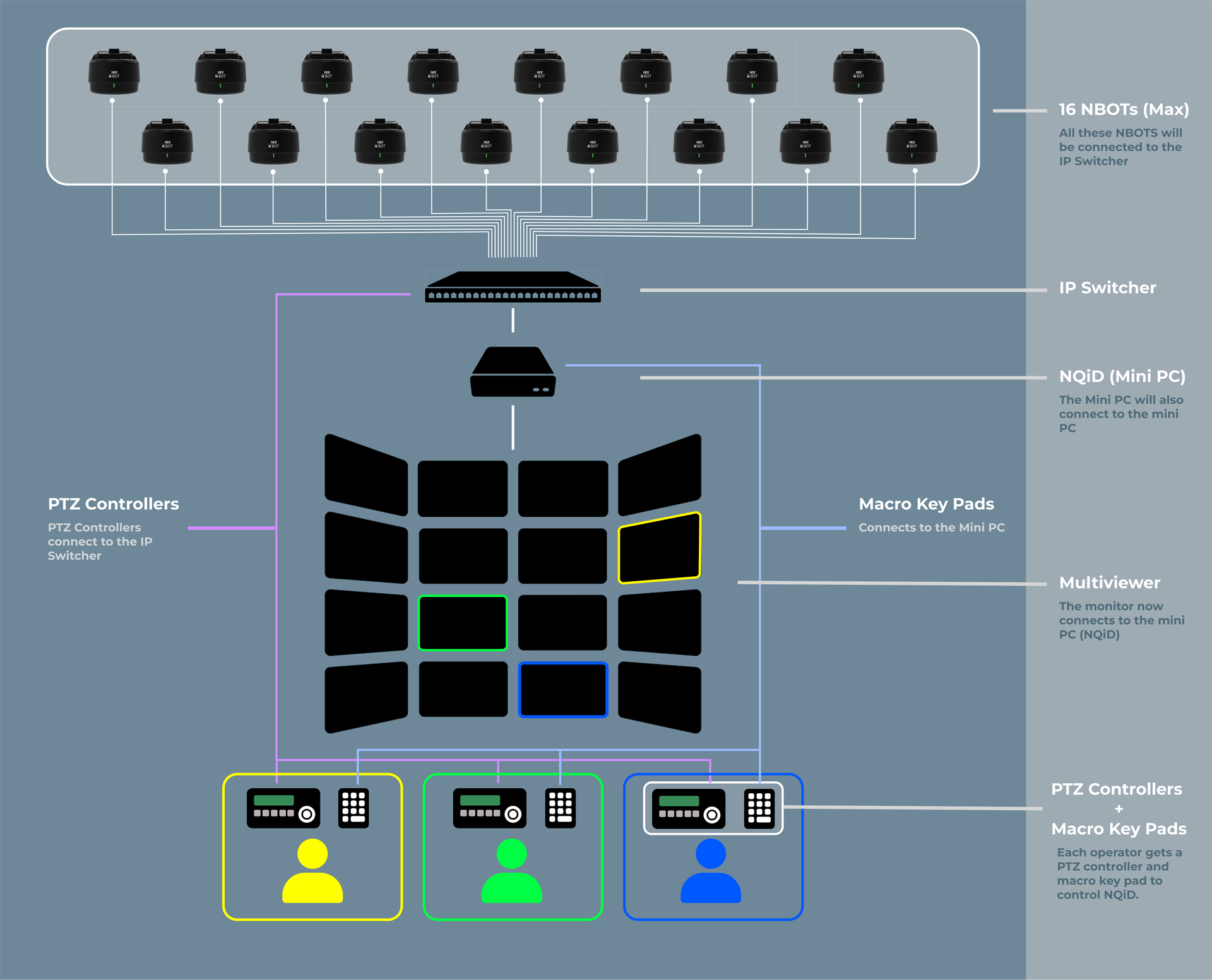
In reality shows, variety programs, sports broadcasts, and drama productions, up to three camera operators can seamlessly manage as many as 16 NBOT units simultaneously. With flexible scalability, NQiD enables you to expand the number of controlled cameras virtually without limit — making it ideal for any high-demand multi-camera setup.

Flexible Camera Assignment
Each camera operator can control up to 16 NBOTs, Press a button, take control, and move smoothly between camera angles-ideal for fast-paced productions.
Supports up to 16 cameras
Scale your setup from small productions to complex multi-camera enviroments.
NQiD IP Routing
NQiD reassigns IP addresses and port numbers to each NBOT.

Seamless integration
Compatible with NBOT and PTZ controllers via NDI / VISCA over IP.
Package Components
NQiD

PTZ Controller
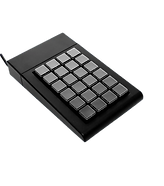
Macro Key Pad


3
NQiD (1) + PTZ Controller (3) + Macro Keypad (3)
How It Works
Intuitive camera control designed for collaborative production enviroments
Up to 3 Camera Operators, 16 NBOTs
Up to 3 users (like camera operators or production teams) can connect to the system at the same time
Operator 1
Yellow
Operator 2
Green
Operator 3
Blue


Control Made Easy
Instantly select up to 16 NBOT units via a macro keyboard, and start recording with a single click — a smart shooting solution that delivers both speed and precision.

PTZ Joystick
Pan, tilt, zoom, focus, pan speed, preset etc. control

Macro Key Pad
Record and stop remotely.
Color-coded one touch camera selection
Hands-On, Hassle-Free Control
Designed for intuitive operation with no learning curve
PTZ + Macro Key Pad
Each camera operator gets a professional PTZ joystick controller paired with a customized macro pad for seamless operation. You can record and stop remotely with our NQiD macro pads!
One Button, One NBOT
Each button is mapped to a specific NBOT camera. No navigating through menus or complex interfaces-just press and take control.
Save Setup Time
Dramatically reduce studio setup time with full IP-based production.
Macro Keypad Control
NQiD works with any macro keypad, including ours, to select cameras and color-code them by operators on the multiviewer and also instantly record and stop with your macro keypad.
Allows up to 16 camera connections
Instantly record and stop directly from the macro keypad
Personalize every button with a fully customizable macro keypad.

Colors Keep It Clear
Visual organization system for multiple camera operators
Color-Coded System
To keep things organized, operator is assigned a color that is consistently reflected across the entire system:
1
Operator Yellow
2
Operator Green
3
Operator Blue

Color-Coded System
The color-coding system extends throughout the entire NQiD ecosystem:

Multiviewer Interface
Multiviwers that has up to 16 screens and also 9 screens are possible if necessary.

Macro Keypad Buttons
Camera feeds are outlined in colors to clearly indicate which operator has control. You can also start and stop recording directly from your macropad for seamless operation.
No Hassle, No Confusions
Even with 3 operators controlling 16 nbots, there will be no confustions, just a simple effective set up.
Scale With Confidence
Build to grow with your production needs
.png)
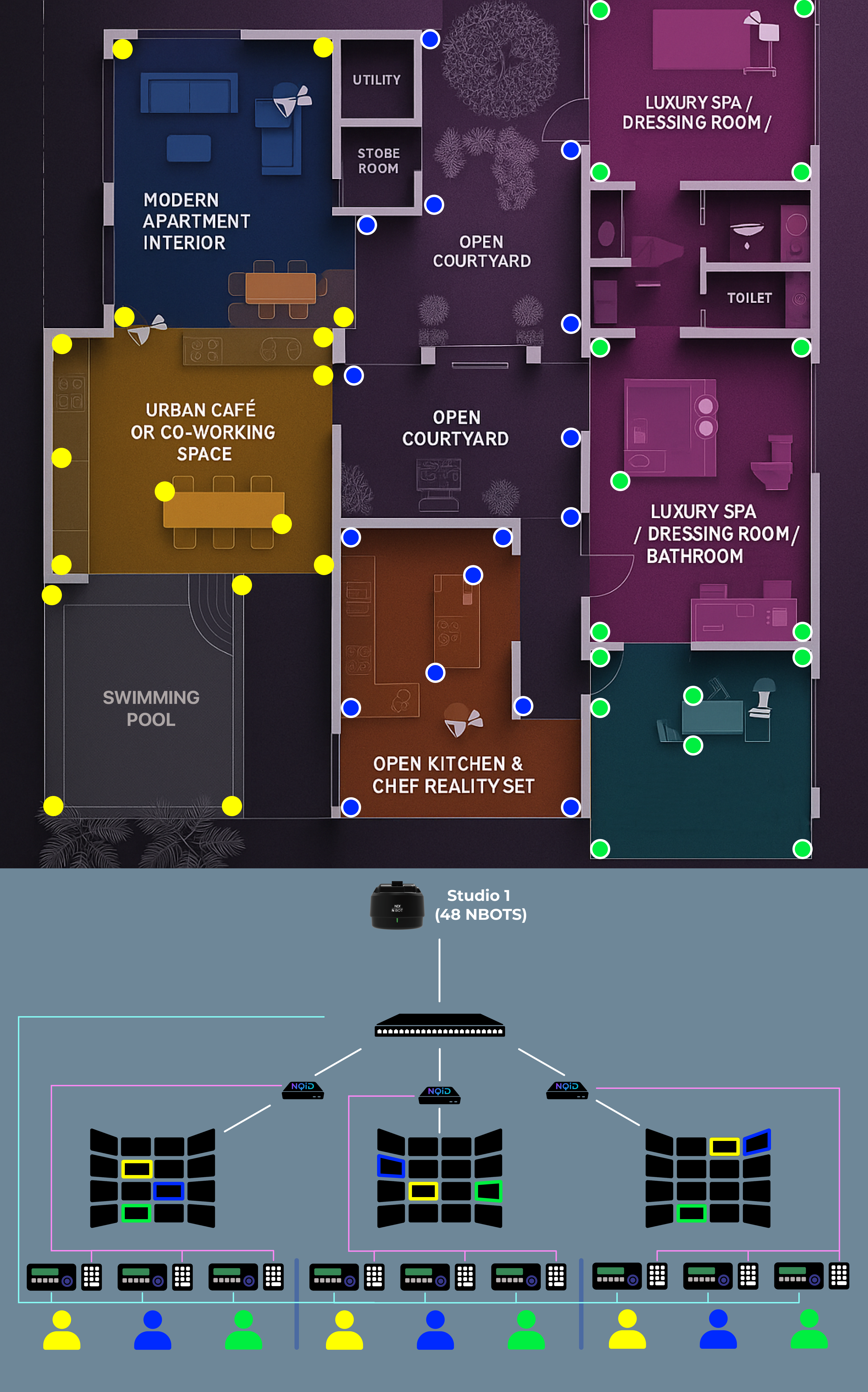


NDI-Based Centralized Control Across Studios
NQiD simplifies multi-camera control over IP, ideal for modern, distributed production setups.
Core Benefits
-
Multi-Studio Connectivity
Control NBOTs across multiple locations via a single IP network. -
Unified Multiviewer Interface
Manage all cameras from one screen with real-time PTZ and record control. -
Operator-Friendly Design
Color-coded camera selection for fast, clear operation by multiple users (3). -
All IP Workflow
No matrix switchers or extra cabling — everything runs through NDI. -
Scalable & Flexible
Easily expand across studios or production spaces with minimal setup.
Ideal For:
Reality shows, observational entertainment (used during the filming of Netflix’s Single's Inferno 1 & 2), sports broadcasting, film production, and live show hybrid event production
Schools, studios, and corporate AV
Why NQiD?
The smarter solution for professional camera control.
Multi-Operator Enviroment
Built specifically for minimal operators to work collaboratively with multipe cameras without interference.


Remote Camera Control
Real-time control and feedback for precise camera movements such as zoom, focus, record, etc.
Visual, Team-Friendly
Color-coded interface makes it easy to identify who's controlling what.
